Improving the TTC Bus Passenger Info Display (PID) with software only changes
Stop request confirmation gets buried in the display rotation. Field research identified two compounding issues and proposed a software-only fix.
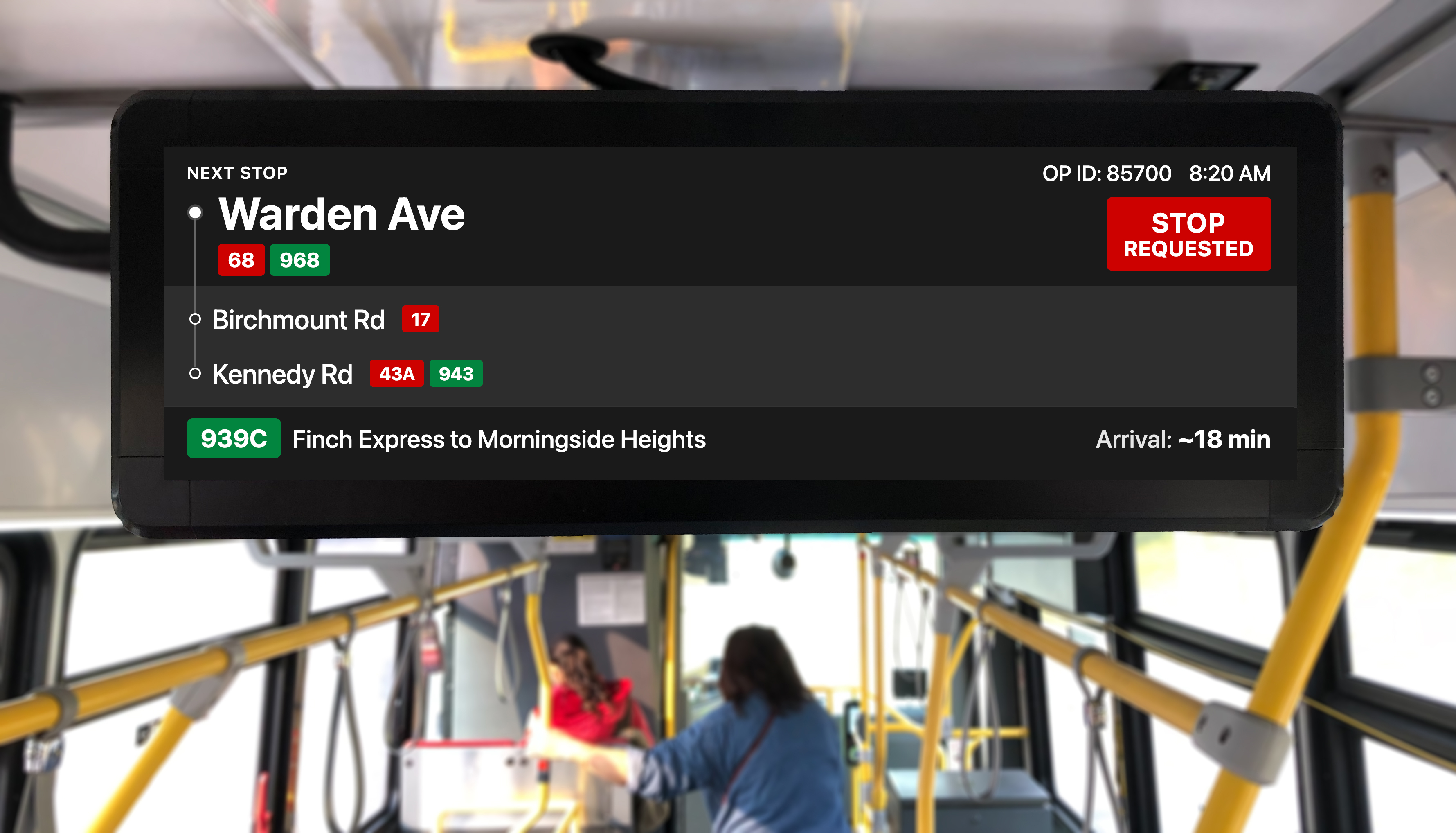
Fig 1.0: Proposed redesign of the TTC bus Passenger Information Display (PID)
RoleResearch & Design (Solo)
Duration6 weeks (2023, June - July)
MethodsField Observation, Interviews
StatusDesign Proposal
Overview
At a glance
Field observation across 6 routes revealed riders pressing the stop button multiple times, not from impatience, but because visual confirmation disappears into a rotating display before they can verify it
The proposed solution is a badge that appears immediately on button press and remains visible outside the content rotation: the only software-only approach that closes both the timing and persistence gaps without disrupting route information
The proposal was well received by TTC's passenger information team; they were already aware of these issues and had independently developed a new display design grounded in a unified design system aligned with Metrolinx
Findings
Two related issues with stop request feedback
Research revealed that the stop request feedback has two compounding problems: delayed initial response and confirmation that cycles away before riders can verify it.
Video 1.0: Both issues captured. Delayed feedback after button press (Issue 01) and confirmation disappearing into rotation (Issue 02)
Issue 01: Timing
Delayed visual confirmation
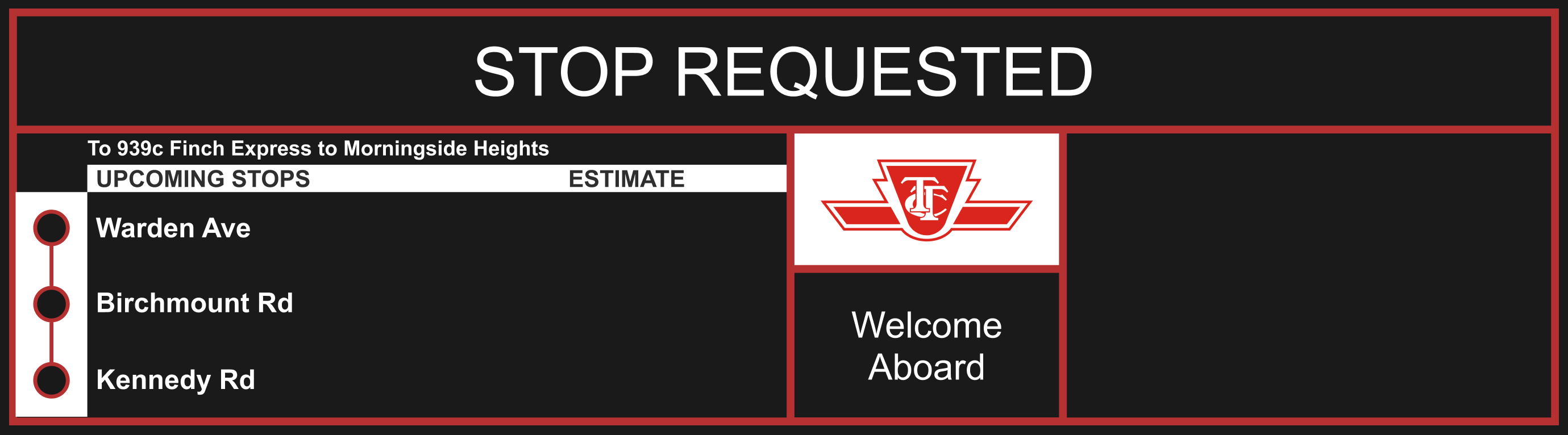
Pressing the stop button triggers an audible chime immediately, but the "Stop Requested" visual confirmation is queued as the next item in the rotation. The rider must wait for the current item to finish displaying before seeing it. This creates cognitive dissonance: riders hear confirmation but don't see it on screen immediately.
During observation, this led to repeat button presses. A second rider who missed hearing the initial chime would press again, receiving no chime (already triggered) and no visual feedback to check back on, leaving them uncertain if a stop was actually requested.
I heard the ding, but I couldn't see anything on the screen saying stop requested. So I pressed it again just to be safe.
Rider during interview, 29 Dufferin route
Issue 02: Persistence
Confirmation disappears into rotation
The display cycles through 5 information types every ~5 seconds. When a stop is requested, the "Stop Requested" confirmation is added to the rotation queue and cycles alongside all other content.
Riders who missed hearing the chime had to stay glued to the screen for the full rotation cycle to visually confirm their stop was registered. This demands sustained attention in an environment where glances are typically under 3 seconds.
I saw it say stop requested for a second, then it switched to something else. I'm not sure if the stop request is still active.
Rider during interview, 939 Finch Express
Event Timeline
0.0s
Rider presses stop button
Physical press registers with the system
0.1s
Auditory chime plays
Confirms press was registered (heard but not seen immediately)
0–5s
Issue 01: Display is mid-rotation on another item. “Stop Requested” is queued as the next item and will appear once the current item finishes (up to 5s).
5s
Visual confirmation appears
Display shows “Stop Requested”, visible for ~5 seconds
10s
Display cycles to other content
Confirmation disappears; rotation resumes (next stop, current time, operator id etc.)
10–15s
Issue 02: “Did it work?” Rider glancing at screen sees no confirmation. Uncertainty window: the re-press risk is highest here.
15s
“Stop Requested” re-appears
Rotation brings it back, but rider may have already re-pressed during the 10–15s gap
Core Finding
Audio-only confirmation fails under glance-based conditions
Riders glance at displays for a few seconds at most. When audio and visual feedback don't align, the brain flags a conflict between what was heard and what can't be confirmed visually. This is what triggers the repeat press.
More critically: audio-only feedback excludes deaf and hard-of-hearing riders entirely. Visual confirmation is not an enhancement. It's parity.
Research Approach
How I structured the research
Field observation was chosen over surveys or analytics because the behaviour under investigation (repeat button presses) is contextual. It only makes sense when you see where the rider is looking, how long they wait, and what the display is showing at that moment.
Field Observation
6 routes over 3 weeks
Routes selected for ridership volume and geographic spread: 29 Dufferin, 939 Finch Express, 54 Lawrence East, 95 York Mills, 102 Markham Road, 133 Neilson
Observed during peak (7–9 AM, 5–7 PM) and off-peak hours
Tracked button press frequency, rider gaze direction, and display state at moment of press
Total of ~18 hours of in-vehicle observation
Rider Interviews
8 riders, in-context
Recruited riders who had just pressed the button (observed the behaviour first, then asked about it)
Short semi-structured interviews (3–5 minutes) conducted after leaving the bus
Focused on: what they were looking for, whether they felt certain their stop was registered, and what would help
Themes synthesized through affinity mapping
Methodological Note
This research is directional, not statistically representative
8 interviews and 6 routes are sufficient to identify a behavioural pattern and form a design hypothesis, but not to generalize across the entire TTC network. The pilot evaluation logic later in this study is designed to generate the statistical evidence this exploratory phase intentionally did not.
Alternatives Considered
Why other approaches fall short
Before landing on the persistent badge, I evaluated three other software-only approaches against the core requirement: a rider must be able to confirm their stop is registered in a single glance, at any point after pressing the button.
Rejected
Larger / brighter "Stop Requested" text
Increasing the size or contrast of the existing message addresses salience, not persistence. A larger message that disappears in 5 seconds still can't be verified during a 25-second rotation cycle. Riders can see it when it's visible, but the problem is they can't find it when they look.
Rejected
Extended rotation dwell time
Keeping "Stop Requested" on screen for longer (e.g., 10 seconds instead of 5) would still cycle away. Any approach that enters the rotation queue eventually disappears. Additionally, extending dwell time delays route and stop information that riders also need.
Rejected
Full-screen takeover on button press
Replacing the entire display with "STOP REQUESTED" for 5–10 seconds guarantees visibility but blocks all other information. A rider looking for their next stop or transfer connection loses access to wayfinding data at the moment they need it most. Confirmation should be additive, not substitutive.
Each rejected approach fails for the same structural reason: it treats "Stop Requested" as content to be displayed rather than a persistent state to be communicated.
The Solution
Persistent badge with immediate response
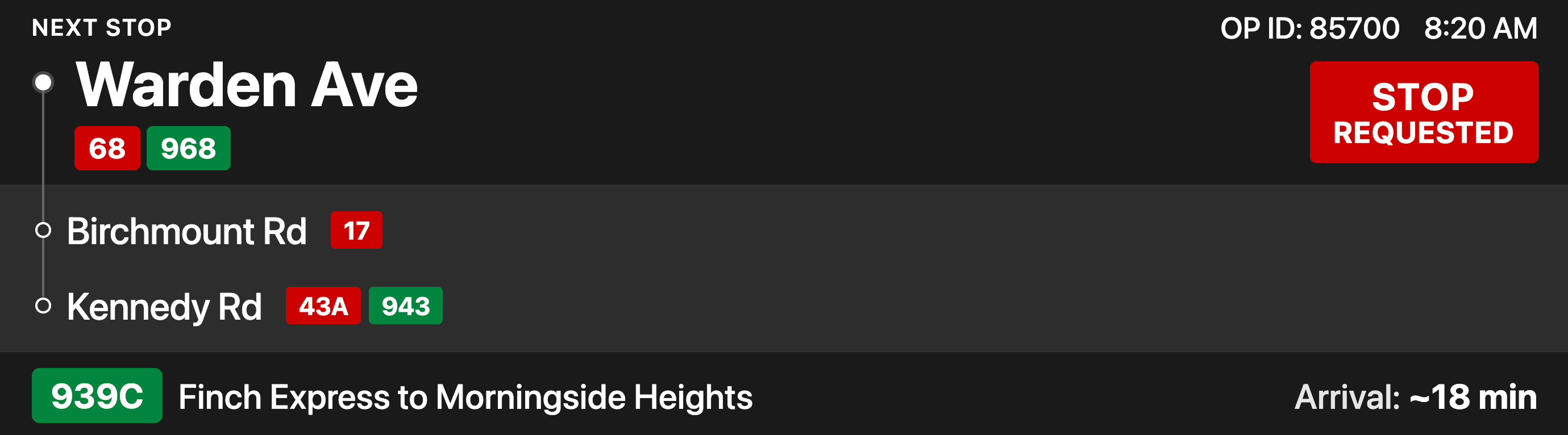
A dedicated zone outside the content rotation that appears instantly when the button is pressed and remains visible until the bus reaches the stop: the only software-only approach that enables glance-resolvable confirmation without disrupting route information.
The proposed design below includes two major additions beyond the core fix: transfer connection badges at each stop, and a destination arrival time. Further UX improvements are detailed in the breakdown below.
Fig 3.0: Proposed persistent badge. Appears instantly on press and remains visible until the stop is reached
Critical Assumptions
Tested / Observed
Riders glance at display within seconds of pressing button
Repeat presses are driven by uncertainty, not impatience
Badge concept is understood without explanation (validated in informal comparison)
Untested / Hypothesized
Display firmware supports dynamic zone allocation (requires engineering confirmation)
Persistent badge won't create alert fatigue over time (requires longitudinal study)
Badge remains legible under all lighting conditions (requires on-vehicle testing)
What Would Invalidate This Model
If repeat press behavior persists after badge deployment, the problem is not visibility but deeper trust calibration; riders may not trust any system feedback regardless of persistence.
Known risks and edge cases
Visual crowding during high-density information states
Badge habituation risk over time reducing attention value
Current and Proposed
Current
Proposed
Fig 4.0: Drag to compare proposed persistent badge vs. current rotating confirmation
Why the proposed design works better
The redesign applies established UX principles to reduce cognitive load and improve at-a-glance comprehension for riders in a moving vehicle.
Immediate feedback on input Issue 01: Timing
Current
Button press triggers an audible chime immediately, but "Stop Requested" visual confirmation is queued as the next rotation item
Visual feedback is delayed by the remaining display time of the current item (0–5 seconds)
Audio and visual confirmation are decoupled, creating a window of uncertainty even when the system worked correctly
Proposed
Badge appears on screen at the moment of button press, aligning visual and audio confirmation
Eliminates the 0–5 second gap where the rider has heard the chime but cannot see any confirmation
Closes the cognitive dissonance between what was heard and what is visible
Persistence over rotation Issue 02: Persistence
Current
"Stop Requested" displays as the next rotation item, then cycles back with all other content
Riders must watch and wait for it to reappear
Forces recall of whether they saw it
Proposed
Persistent badge stays visible from the moment the button is pressed
Rider can verify in a single glance at any point
Relies on recognition instead of memory
Visual hierarchy
Current
All content competes at equal weight inside a single cycling header
Stop name, time, and "Stop Requested" share the same visual treatment
Proposed
Three distinct zones (primary, upcoming, route) use size, weight, and spatial separation
Clear reading order where the next stop is always the largest element on screen
Signal-to-noise ratio
Current
Per-stop "Estimate" column shows times for each upcoming stop
The extra column competes for horizontal space with stop names, reducing legibility at distance
Proposed
Per-stop estimates removed; freed horizontal space used for larger stop names and transfer connection badges at applicable stops, shifting the display from a passive progress indicator to an active wayfinding tool
With the per-stop column gone, the destination arrival time becomes the only remaining time value on screen: the one trip-level number that answers whether riders will get there on time
Riders can spot transfer options at a glance without prior route knowledge
Rotate for better experience
The interactive display mockup is best viewed in landscape orientation
Interactive Prototype
Press STOP to compare how each display responds
Stop Requested
Current
Warden Ave
To 939c Finch Express to Morningside Heights
Upcoming StopsEstimate
Warden AveBirchmount RdKennedy Rd
Welcome Aboard
After pressing STOP, the "STOP REQUESTED" does not appear immediately and, once visible, still cycles with other content.
Proposed
Next Stop
OP ID: 85700
Warden Ave
68968
StopRequested
Birchmount Rd
17
Kennedy Rd
43A943
After pressing STOP, the "STOP REQUESTED" badge appears immediately and stays visible.
Fig 3.1: Interactive prototype — Press the STOP button to compare how each display responds. Current cycles "STOP REQUESTED" with other content; Proposed shows it immediately and keeps it persistently on screen
Concept Validation
Four commuters reviewed a printed side-by-side mockup of the current and proposed display, providing an early read on whether the redesign resolved the core confusion.
Uncertainty Reduced
Riders understood the persistent badge without explanation; the always-visible confirmation resolved the doubt that drove repeat presses
Uncertainty Remaining
On-vehicle behavior under real lighting and motion; long-term habituation effects; interaction with service alerts
Decision This Enables
Sufficient confidence to propose a controlled pilot, not full fleet rollout; pilot design must address remaining uncertainties
Considerations for engineering
Transfer connection data: TTC route stops data exists, but can the on-vehicle display system store or fetch a dataset of that size without performance constraints?
Real-time GTFS-RT feed: can the on-vehicle system consume a live trip update feed to resolve destination ETA, and what is the fallback if the feed drops?
Outcome
Where this landed
In late 2023, after publishing this case study, TTCriders.ca connected me with TTC's passenger information display team. In a 45-minute meeting, the proposal was well received. The team shared that they had independently identified the same issues and were already developing a new display design grounded in a unified design system aligned with Metrolinx, with incremental rollout planned.
Pilot evaluation logic
Baseline signalRepeat press frequency on control routes (current state)
Expected changeDirectional reduction in repeat presses on pilot routes
Observation window2–4 weeks post-deployment to allow behavioral adjustment
Confounds to monitorRoute type (express vs local), rider familiarity
Failure signalNo measurable change in repeat behavior
Deployment scope5–10 buses on high-frequency routes for A/B comparison
Beyond the Core Problem
Additional opportunity from research
Rider interviews surfaced a need beyond stop confirmation. This was consciously deprioritized to maintain focus on the confirmation problem, the most tractable issue with clearest evidence. It represents potential future work, contingent on validating the core solution first.
Future Opportunity
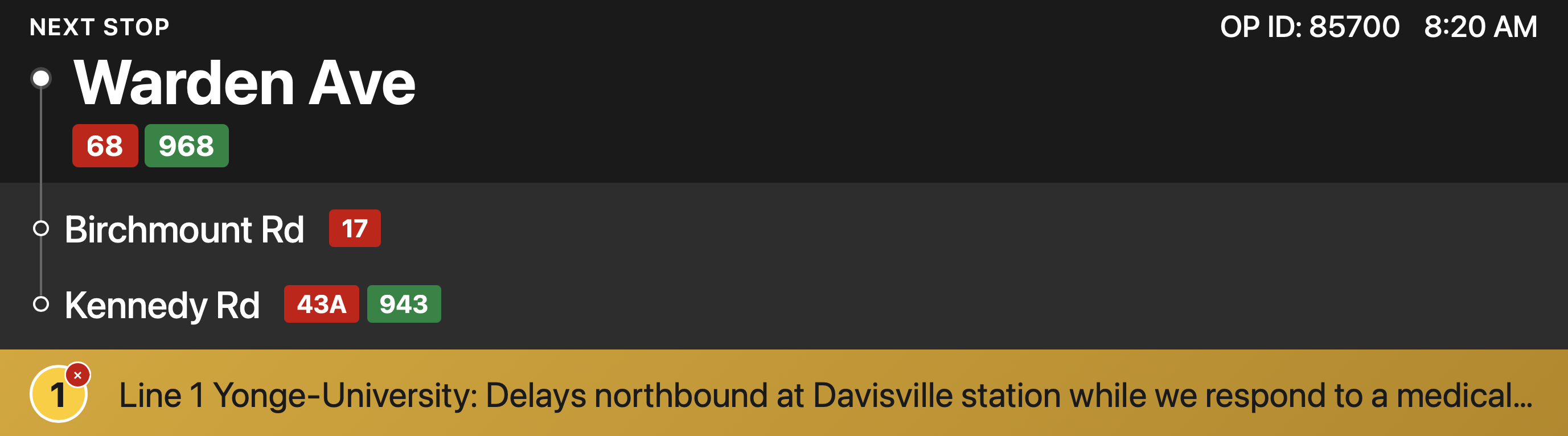
Fig 5.0: Proposed display mockups showing transfer connections and real-time subway alerts
Real-time subway service alerts
Surface subway disruptions on bus displays for connecting routes. Riders learn about delays before arriving, with time to adjust plans.
Rider value: Make informed decisions while still on the bus.
Accessibility value: Persistent on-screen alerts are essential for deaf and hard-of-hearing riders who can't rely on verbal announcements.
Engineering consideration: Requires PID access to TTC's service alerts API. Surfacing subway alerts alongside stop confirmation risks overwhelming passengers with competing information.
Reflection
What I learned
User behavior
Repeat button presses weren't user error; they were a rational response to unclear feedback.
Scope constraint
The constraint of "software only" focused the solutions on what was actually achievable.
What I'd do differently
Validate the software assumption earlier
Engaging engineering contacts before finalizing the proposal would have strengthened feasibility claims
Frame system-level impact upfront
Leading with how display changes affect the entire network, not just individual riders, would better resonate with stakeholders
Test with more accessibility participants
A larger sample would validate the accessibility value propositions more rigorously
The bigger picture
Every pixel is an opportunity
Every pixel on a transit display is an opportunity to reduce rider uncertainty. When hardware investments are already in place, thoughtful UX refinements can unlock significant value at minimal cost.